第 4 节 / 共 8 节
RAG 开发(二):意图识别
EduRAG 笔记(day04)
EduRAG项目
【了解】今日内容介绍
- Langchain框架
- Models
- 核心包
- 核心组件
- 使用场景
【理解】Langchain
简介
含义:围绕LLMs(大语言模型)建立的一个框架,可以快速开发大模型应用。
作用:LangChain自身并不开发LLMs,它的核心理念是为各种LLMs实现通用的接口,把LLMs相关的组件“链接”在一起
官网:https://docs.langchain.com/oss/python/integrations/providers/overview
核心包
- langchain-core:聊天模型和其他组件的基础抽象。
- 集成包(例如 langchain-openai、langchain-anthropic 等):重要的集成被拆分为轻量级的独立包,由 LangChain 团队和集成方共同维护。
- langchain:包含链(chains)、智能体(agents)和检索策略,这些构成了应用的认知架构。
- langchain-community:由社区维护的第三方集成。
核心组件
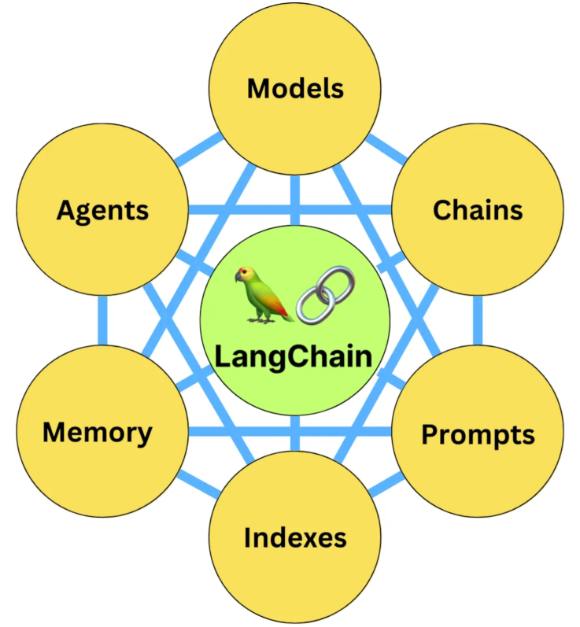
Langchain之6大组件:
- Models:各种模型,集成各种厂家API和开源模型。支持3种用法,generate、chat、embedding
- Prompts:提示词模板,内置了一些提示词。 主要功能类似于字符串.format
- Memory:记忆,短期记忆和长期记忆
- Indexes:文档加载、文档切块、 向量化(和向量库相关的API)
- Chains:提示词链,编排简单模型调用工作流
- Agents:智能体,只支持基于React算法的智能体
Models
目前支持三种模型类型:
- LLMs:大语言模型接收文本字符作为输入,返回的也是文本字符.
- 聊天模型:基于LLMs, 不同的是它接收聊天消息(一种特定格式的数据)作为输入,返回的也是聊天消息.
- 文本嵌入模型:文本嵌入模型接收文本作为输入, 返回的是浮点数列表.
LLMs
接收文本字符作为输入,返回的也是文本字符.
def demo01():
    from langchain_openai import ChatOpenAI
    import os

    # 实例化模型

    # os.environ.get:从环境变量中通过key获取value

    model = ChatOpenAI(
        base_url=os.environ.get('base_url', 'https://dashscope.aliyuncs.com/compatible-mode/v1'),
        model='qwen-plus',
        openai_api_key=os.environ.get('DASHSCOPE_API_KEY', 'sk-XXXXXX'),
        max_tokens=1000,
        temperature=0
    )

    # 获取问答结果
    result = model.invoke("帮我讲个笑话吧")
    print(result.content)

def demo02():
    # from langchain_community.llms import Ollama # Langchain 0.x版本使用
    from langchain_ollama import OllamaLLM

    # 实例化模型
    # model = Ollama(model="qwen2.5:7b") # Langchain 0.x版本使用
    model = OllamaLLM(model="qwen2.5:7b")

    # 获取问答结果
    result = model.invoke("请给我讲个笑话吧")
    print(result)
Chat Models
聊天消息包含下面几种类型,使用时需要按照约定传入合适的值:
- AIMessage:就是 AI 输出的消息,可以是针对问题的回答.
- HumanMessage:人类消息就是用户信息,由人给出的信息发送给LLMs的提示信息,比如“实现一个快速排序方法”.
- SystemMessage:可以用于指定模型具体所处的环境和背景,如角色扮演等。你可以在这里给出具体的指示,比如“作为一个代码专家”,或者“返回json格式”.
- ChatMessage:Chat 消息可以接受任意角色的参数,但是在大多数时间,我们应该使用上面的三种类型.
Embedding Models
Prompts
支持两种模板:
- zero-shot:0个示例
- few-shot:少数几个示例
相当于字符串format。
基础提示模板
zero-shot:
def demo01():
    # from langchain import PromptTemplate # Langchain 0.x版本使用
    from langchain_core.prompts import PromptTemplate
    # from langchain_community.llms import Ollama  # Langchain 0.x版本使用
    from langchain_ollama import OllamaLLM

    # model = Ollama(model="qwen2.5:7b") # Langchain 0.x版本使用
    model = OllamaLLM(model="qwen2.5:7b")


    # 定义模板
    template = "我的邻居姓{lastname},他生了个儿子,给他儿子起个名字"

    prompt = PromptTemplate(
        input_variables=["lastname"],
        template=template)

    prompt_text = prompt.format(lastname="王")
    print(prompt_text)
    # result: 我的邻居姓王,他生了个儿子,给他儿子起个名字

    result = model.invoke(prompt_text)
    print(result)
Few-Shot
def demo02():
    # from langchain import PromptTemplate, FewShotPromptTemplate # Langchain 0.x版本使用
    from langchain_core.prompts import PromptTemplate, FewShotPromptTemplate
    from langchain_ollama import OllamaLLM

    model = OllamaLLM(model="qwen2.5:7b")

    examples = [
        {"word": "开心", "antonym": "难过"},
        {"word": "高", "antonym": "矮"}
    ]

    example_template = """
    单词: {word}
    反义词: {antonym}
    """

    example_prompt = PromptTemplate(
        input_variables=["word", "antonym"],
        template=example_template,
    )

    few_shot_prompt = FewShotPromptTemplate(
        # 前缀
        prefix="给出每个单词的反义词",
        # 例子
        examples=examples,
        example_prompt=example_prompt,
        # 后缀
        suffix="单词: {input} 反义词:",
        input_variables=["input"],
        example_separator="\n",
    )

    prompt_text = few_shot_prompt.format(input="粗")

    print(prompt_text)
Chat提示词模板
zero-shot:
def demo04():
    from langchain_core.prompts import ChatPromptTemplate, HumanMessagePromptTemplate
    from langchain_core.messages import SystemMessage
    from langchain_ollama import OllamaLLM

    # 实例化模型
    model = OllamaLLM(model="qwen2.5:7b")

    # 系统信息
    system_prompt = SystemMessage("你是取名专家。")
    # 用户信息模版
    human_str = "我的邻居姓{lastname},他生了个儿子,给他儿子起个名字。"
    human_template = HumanMessagePromptTemplate.from_template(human_str)
    # 组装
    chat_template = ChatPromptTemplate.from_messages([system_prompt, human_template])
    # 生成最终的提示词
    prompt = chat_template.format_messages(lastname="王")
    print(f'prompt-->{prompt}')

    # 调用模型
    result = model.invoke(prompt)  # 返回结果出了content外,还有元数据信息
    print(f'result-->{result}')
few-shot:
def demo05():
    from langchain_core.prompts import ChatPromptTemplate, MessagesPlaceholder
    from langchain_ollama import OllamaLLM

    # 实例化模型
    model = OllamaLLM(model="qwen2.5:7b")

    # 创建 prompt 模版
    prompt_template = ChatPromptTemplate.from_messages(
        [
            ("system", "给出每个单词的反义词"),
            # 占位符
            MessagesPlaceholder("history"),
            ("human", "{question}")
        ]
    )
    # 创建 few-shot prompt
    # history = [
    #     HumanMessage(content="开心"),
    #     AIMessage(content="难过"),
    #     HumanMessage(content="高"),
    #     AIMessage(content="矮")
    # ]
    history = [("human", "开心"), ("ai", "难过"), ("human", "高"), ("ai", "矮")]
    prompt = prompt_template.format_messages(history=history, question="富有")
    print(f"prompt-->{prompt}")

    # 调用模型
    result = model.invoke(prompt)
    print(f'result-->{result}')
Chains(链)
def demo01():
    from langchain_core.prompts import PromptTemplate
    from langchain_ollama import OllamaLLM

    # 定义模板
    template = "我的邻居姓{lastname},他生了个儿子,给他儿子起个名字"

    prompt = PromptTemplate(
        input_variables=["lastname"],
        template=template)

    # 实例化模型
    llm = OllamaLLM(model="qwen2.5:7b")

    chain = prompt | llm
    # 执行链
    print(chain.invoke("王"))
def demo02():
    from langchain_core.prompts import PromptTemplate
    from langchain_ollama import OllamaLLM
    # 创建第一条链
    template = "我的邻居姓{lastname},他生了个儿子,给他儿子起个名字"

    first_prompt = PromptTemplate(
        input_variables=["lastname"],
        template=template, )

    # 实例化模型
    llm = OllamaLLM(model="qwen2.5:7b")

    first_chain = first_prompt | llm

    # 创建第二条链
    second_prompt = PromptTemplate(
        input_variables=["child_name"],
        template="邻居的儿子名字叫{child_name},给他起一个小名")

    second_chain = second_prompt | llm

    # 链接两条链
    overall_chain = first_chain | second_chain

    print(overall_chain)
    print('*' * 80)
    # 执行链,只需要传入第一个参数
    catchphrase = overall_chain.invoke("王")

    print(catchphrase)
output_parsers
使用流程:
# 1.实例化模型

# 2.创建提示词模板: 提示词模板中除了用户输入的业务逻辑以外,最后需要追加解析器对应的format_instruction

# 3.实例化输出解析器:需要实例化对应格式的解析器(json -> JsonOutputParser....),如果系统内置的无法满足业务需求,可以自定义输出解析器

# 4.使用链组合: 模板|模型|解析器
StrOutputParser
以字符串的格式输出结果
def demo01():
    from langchain_core.output_parsers import StrOutputParser
    from langchain_core.prompts import ChatPromptTemplate
    from langchain_ollama import OllamaLLM

    # 实例化模型
    model = OllamaLLM(model="qwen2.5:7b")

    # 创建简单链
    prompt = ChatPromptTemplate.from_template("解释{topic}是什么?回答控制20字以内")
    chain1 = prompt | model
    result1 = chain1.invoke({"topic": "ai"})
    print(f"result1-->{result1}")

    # 添加字符串解析器
    parser = StrOutputParser()
    chain2 = prompt | model | parser
    result2 = chain2.invoke({"topic": "ai"})
    print(f"result2-->{result2}")
CommaSeparatedListParser
逗号分割,转成list[str]格式输出
def demo02():
    from langchain_core.output_parsers import CommaSeparatedListOutputParser
    from langchain_core.prompts import ChatPromptTemplate
    from langchain_ollama import OllamaLLM

    # 实例化模型
    model = OllamaLLM(model="qwen2.5:7b")

    # 创建列表解析器
    parser = CommaSeparatedListOutputParser()

    # 创建带格式说明的提示模板
    # format_instructions = parser.get_format_instructions()
    # print(format_instructions)

    prompt = ChatPromptTemplate.from_template(
        "用中文列出{topic}的五个最重要特点。\n{format_instructions}"
    )

    # 组合组件
    chain = prompt | model | parser

    # 调用链
    result = chain.invoke({
        "topic": "大模型",
        "format_instructions": "你的回答应该是一个用逗号分隔的值的列表,例如:foo, bar, baz或 foo,bar,baz"
    })
    print(result)
JsonOutputParser
把json结构的数据转成dict类型进行输出
def demo03():
    from langchain_core.output_parsers import JsonOutputParser
    from langchain_core.prompts import ChatPromptTemplate
    from langchain_ollama import OllamaLLM

    # 实例化模型
    model = OllamaLLM(model="qwen2.5:7b")

    # 创建JSON解析器
    json_parser = JsonOutputParser()

    # 创建带格式说明的提示模板
    json_format_instructions = json_parser.get_format_instructions()
    print(json_format_instructions)

    json_prompt = ChatPromptTemplate.from_template(
        "生成一个包含{person}基本信息的JSON。应包括姓名、职业、年龄和技能列表, 不要包含任何注释或额外说明。\n{format_instructions}"
    )

    # 组合组件
    json_chain = json_prompt | model | json_parser

    # 调用链
    result = json_chain.invoke({
        "person": "雷军",
        "format_instructions": "返回一个Json对象"
    })

    print(result)
PydanticOutputParser
def demo04():
    from langchain_core.prompts import ChatPromptTemplate
    from langchain_core.output_parsers import PydanticOutputParser
    from langchain_ollama import OllamaLLM
    # pydantic
    from pydantic import BaseModel, Field
    from typing import List


    # 实例化模型
    model = OllamaLLM(model="qwen2.5:7b")

    # 定义Pydantic模型
    class Movie(BaseModel):
        title: str = Field(description="电影标题")
        director: str = Field(description="导演姓名")
        year: int = Field(description="上映年份")
        # todo : 单标签多分类 (每个电影只能有个类型)、 多标签多分类(一个电影可以有多个类型)
        genre: List[str] = Field(description="电影类型")
        rating: float = Field(description="评分(1-10)")

    # 创建Pydantic解析器
    pydantic_parser = PydanticOutputParser(pydantic_object=Movie)

    # 创建带格式说明的提示模板
    format_instructions = pydantic_parser.get_format_instructions()
    print(format_instructions)

    pydantic_prompt = ChatPromptTemplate.from_template(
        "生成一部{genre}电影的信息。\n{format_instructions}"
    )

    # 组合组件
    pydantic_chain = pydantic_prompt | model | pydantic_parser

    # 调用链
    movie_data = pydantic_chain.invoke({
        "genre": "科幻",
        "format_instructions": format_instructions
    })
    print(movie_data)
提示词模板:
The output should be formatted as a JSON instance that conforms to the JSON schema below.

As an example, for the schema {"properties": {"foo": {"title": "Foo", "description": "a list of strings", "type": "array", "items": {"type": "string"}}}, "required": ["foo"]}
the object {"foo": ["bar", "baz"]} is a well-formatted instance of the schema. The object {"properties": {"foo": ["bar", "baz"]}} is not well-formatted.

Here is the output schema:
```
{"properties": {"title": {"description": "电影标题", "title": "Title", "type": "string"}, "director": {"description": "导演姓名", "title": "Director", "type": "string"}, "year": {"description": "上映年份", "title": "Year", "type": "integer"}, "genre": {"description": "电影类型", "items": {"type": "string"}, "title": "Genre", "type": "array"}, "rating": {"description": "评分(1-10)", "title": "Rating", "type": "number"}}, "required": ["title", "director", "year", "genre", "rating"]}
```
自定义解析器
作用:用于输出用户想要的自定义格式, 需要集成BaseOutputParser, 实现parse(解析大模型输出的字符串,转化成自定义格式)和get_format_instruction(提供提示词模板,作为提示词的一部分,用于规定大模型输出的格式)
def demo05():
    from langchain_core.output_parsers import BaseOutputParser
    from typing import Dict, Any
    from langchain_core.prompts import ChatPromptTemplate
    from langchain_ollama import OllamaLLM

    # 实例化模型
    model = OllamaLLM(model="qwen2.5:7b")

    # 泛型:用来规定代码中的数据返回的格式的参数
    class CustomKeyValueParser(BaseOutputParser[Dict[str, Any]]):
        """解析形如'key: value'的文本"""

        # 接受模型输出的文本作为输入: text:模型的输出的问题本
        def parse(self, text: str) -> Dict[str, Any]:
            """从文本中解析键值对"""
            result = {}
            lines = text.strip().split('\n')

            for line in lines:
                if ':' in line:
                    key, value = line.split(':', 1)
                    result[key.strip()] = value.strip()

            return result

        def get_format_instructions(self) -> str:
            """提供格式指导给模型"""
            return """请以'键:值'的格式返回信息,每行一个键值对。
                    例如:
                    名称:爱因斯坦
                    职业:物理学家
                    贡献:相对论"""

    # 使用自定义解析器
    custom_parser = CustomKeyValueParser()
    custom_prompt = ChatPromptTemplate.from_template(
        "提供关于{person}的基本信息。\n{format_instructions}"
    )

    # 组合组件
    custom_chain = custom_prompt | model | custom_parser

    # 调用模型
    result = custom_chain.invoke({
        "person": "屠呦呦",
        "format_instructions": custom_parser.get_format_instructions()
    })
    print(result)
Memory
大模型本身不具备上下文的概念,它并不保存上次交互的内容,ChatGPT之所以能够和人正常沟通对话,因为它进行了一层封装,将历史记录回传给了模型。
两种:
- 短期记忆:Memory【业界的叫法,需要和langchain的memory组件进行区分】
- 长期记忆:History
最常用的长期记忆的对象:ChatMessageHistory
- message_to_dict: 把长期记忆进行序列化,转为基本类型,方便保存
- message_from_dict:把序列化后的长期记忆进行反序列化,进行加载,转成ChatMessageHistory对象
def demo01():
    from langchain_community.chat_message_histories import ChatMessageHistory
    from langchain_core.messages import messages_to_dict, messages_from_dict
    import json

    # 1.创建一个ChatMessageHistory对象,用来存储对话信息
    history = ChatMessageHistory()
    # 添加用户消息
    history.add_user_message("在吗?")
    # 添加大模型消息
    history.add_ai_message("在")
    # 打印所有消息
    print(f'history.messages-->{history.messages}')

    # 2.可以将history.messages中的信息保存到字典中,然后保存到数据库或者文件中,方便后续读取
    # 2.1 messages_to_dict()方法将history.messages中的信息转换成字典
    dicts = messages_to_dict(history.messages)
    print(f'dicts-->{dicts}')
    # 2.2 这里将dicts保存到文件中
    with open('history.json', 'w', encoding='utf-8') as f:
        f.write(json.dumps(dicts, indent=2, ensure_ascii=False))

    # 3.从文件中读取出字典,然后将字典转换成消息
    # 3.1 读取文件
    messages = json.load(open('history.json', 'r', encoding='utf-8'))
    # 3.2 然后将字典转换成消息
    chat_messages = messages_from_dict(messages)
    print(f'chat_messages-->{chat_messages}')
Indexes
文档加载器
def demo01():
    from langchain_community.document_loaders import UnstructuredFileLoader
    loader = UnstructuredFileLoader('衣服属性.txt', encoding='utf8')
    docs = loader.load()
    print(docs)
    print(len(docs))
    first_01 = docs[0].page_content[:4]
    print(first_01)
    print('*' * 80)
    from langchain_community.document_loaders import TextLoader
    loader = TextLoader('衣服属性.txt', encoding='utf8')
    docs = loader.load()
    print(docs)
    print(len(docs))
    first_01 = docs[0].page_content[:4]
    print(first_01)
    # 打印结果:
    '''
    [Document(page_content='身高:160-170cm, 体重:90-115斤,建议尺码M。\n身高:165-175cm, 体重:115-135斤,建议尺码L。\n身高:170-178cm, 体重:130-150斤,建议尺码XL。\n身高:175-182cm, 体重:145-165斤,建议尺码2XL。\n身高:178-185cm, 体重:160-180斤,建议尺码3XL。\n身高:180-190cm, 体重:180-210斤,建议尺码4XL。\n面料分类:其他\n图案:纯色\n领型:翻领\n衣门襟:单排扣\n颜色:黑色 卡其色 粉色 杏色\n袖型:收口袖\n适用季节:冬季\n袖长:长袖\n厚薄:厚款\n适用场景:其他休闲\n衣长:常规款\n版型:宽松型\n款式细节:假两件\n工艺处理:免烫处理\n适用对象:青年\n面料功能:保暖\n穿搭方式:外穿\n销售渠道类型:纯电商(只在线上销售)\n材质成分:棉100%', metadata={'source': '衣服属性.txt'})]
    1
    身高:1
    ********************************************************************************
    [Document(page_content='身高:160-170cm, 体重:90-115斤,建议尺码M。\n\n身高:165-175cm, 体重:115-135斤,建议尺码L。\n\n身高:170-178cm, 体重:130-150斤,建议尺码XL。\n\n身高:175-182cm, 体重:145-165斤,建议尺码2XL。\n\n身高:178-185cm, 体重:160-180斤,建议尺码3XL。\n\n身高:180-190cm, 体重:180-210斤,建议尺码4XL。\n\n面料分类:其他\n\n图案:纯色\n\n领型:翻领\n\n衣门襟:单排扣\n\n颜色:黑色 卡其色 粉色 杏色\n\n袖型:收口袖\n\n适用季节:冬季\n\n袖长:长袖\n\n厚薄:厚款\n\n适用场景:其他休闲\n\n衣长:常规款\n\n版型:宽松型\n\n款式细节:假两件\n\n工艺处理:免烫处理\n\n适用对象:青年\n\n面料功能:保暖\n\n穿搭方式:外穿\n\n销售渠道类型:纯电商(只在线上销售)\n\n材质成分:棉100%', metadata={'source': '衣服属性.txt'})]
    1
    身高:1
    '''
文档分割器
CharacterTextSplitter
作用:通过字符长度进行分割, 需要3个参数:分割符号、块大小、块重叠字符数
def demo02():
    from langchain_core.documents import Document
    from langchain_text_splitters import CharacterTextSplitter

    # 创建分词器 separator参数指的是分割的分隔符,chunk_size指的是分割出来的每个块的大小,chunk_overlap指的是每个块之间重叠的大小
    text_splitter = CharacterTextSplitter(separator=" ", chunk_size=5, chunk_overlap=1)

    # 一句话分割
    result1 = text_splitter.split_text("a b c d e f")
    print(f'result1--->{result1}')

    # 多句话分割
    result2 = text_splitter.create_documents(["a b c d e f", "e f g h"])
    print(f'result2--->{result2}')

    # 多句话分割
    result3 = text_splitter.split_documents([Document(page_content="a b c d e f", metadata={"id": "1"})])
    print(f'result3--->{result3}')
RecursiveCharacterTextSplitter
作用:按照指定的分隔符顺序递归分割文本,直到满足文本块大小为止。如果分割到最后一个分隔符未能满足块大小,直接截断。
需要传入4个参数: 块大小、块重叠、长度统计方式(需要把函数作为参数传入,默认用len)、分隔符(列表格式,严格按照内部顺序执行)
def demo03():
    from langchain_text_splitters import RecursiveCharacterTextSplitter

    # 4个参数:
    # 1. 块大小 2.重叠字符数 3. 长度衡量方式:传入一个函数进来,调用函数判断长度
    # 4. 分割符号: 按照列表中的分割符号,从左到右依次进行分割,直到满足块大小限制。 如果分割到最后一个符号未满足块大小,直接截断

    text_splitter = RecursiveCharacterTextSplitter(
        chunk_size=30,  # 每个块最多 100 个字符
        chunk_overlap=6,  # 相邻分块会共享 20 个字符
        # 使用len,中文和英文没有区别;byte
        length_function=len,  # 用字符数来衡量长度
        separators=["\n\n", "\n", " ", ""]  # 会优先尝试按 \n\n 分段,如果太长,再按 \n → 空格 → 逐字符切分。
    )

    text = """
    人工智能正在快速发展,尤其是大语言模型的应用,正在改变人类的工作方式。
    它们可以帮助人们进行写作、代码生成、甚至是科研探索。
    相比之下,新能源的发展同样重要。
    电动车和太阳能正在逐渐替代传统能源,减少碳排放,对全球环境保护至关重要。
    """
    docs = text_splitter.split_text(text)
    print(docs)
分割过程示意图:
SemanticChunker
作用: 把文本基于分隔符分割成多个段落,每个段落进行向量化,计算相似度,再基于分割点阈值进行切分 。 一共需要5个参数:嵌入模型、分割点阈值类型、分割点阈值(控制分割后的文本个数)、分隔符(正则表达式)、分割后每个片段的最小字符数。
优点:切分的效果比较好,尤其是在对语义要求比较高的场景
缺点:速度慢,成本高(要调用大模型)
def demo04():
    from langchain_experimental.text_splitter import SemanticChunker
    from langchain_ollama import OllamaEmbeddings

    embed = OllamaEmbeddings(model="mxbai-embed-large")

    text_splitter = SemanticChunker(
        embeddings=embed,
        breakpoint_threshold_type='percentile',
        # 更低的百分位会更“积极”地切分(数值越小 => 切得越多)
        breakpoint_threshold_amount=40.0,
        # 句子拆分正则为同时识别中/英文终结符
        sentence_split_regex=r'(?<=[。!?.!?])\s*',
        # 每个切分后片段(chunk)至少要有多少个字符
        min_chunk_size=10
    )

    text = """
    人工智能正在快速发展,尤其是大语言模型的应用,正在改变人类的工作方式。
    它们可以帮助人们进行写作、代码生成、甚至是科研探索。
    相比之下,新能源的发展同样重要。
    电动车和太阳能正在逐渐替代传统能源,减少碳排放,对全球环境保护至关重要。
    """

    docs = text_splitter.split_text(text)
    for i, d in enumerate(docs):
        print(f"------ Chunk {i + 1} ------")
        print(d.strip())
        print()
VectorStores
作用:Langchain集成市面上常见的向量库api , 用于和向量库进行交互。 支持chroma、elasticsearch、milvus、faiss、pinecone等常见向量库。
def demo01():
    from langchain_text_splitters import CharacterTextSplitter
    from langchain_chroma import Chroma
    from langchain_community.document_loaders import TextLoader
    from langchain_ollama import OllamaEmbeddings

    # 1.加载文档
    # 创建 TextLoader 对象
    loader = TextLoader('./data/pku.txt', encoding='utf-8')
    # 加载文档
    docs = loader.load()
    # print(f'docs-->{docs}')

    # 2.将文档进行分块
    # 创建 CharacterTextSplitter 对象
    text_splitter = CharacterTextSplitter(separator="\n\n", chunk_size=200, chunk_overlap=30)
    # 分块
    split_docs = text_splitter.split_documents(docs)
    print(f'split_docs-->{split_docs}')

    # 3.将分割后的文档存储到向量数据库中
    # 加载embedding模型
    embedding = OllamaEmbeddings(model="mxbai-embed-large")
    # 创建向量数据库,需要指定 存储的文档和向量模型名称以及持久化目录
    chromadaDB = Chroma.from_documents(documents=split_docs,
                                       embedding=embedding,
                                       persist_directory='./chroma_db')

    # 假如你的向量数据库已经存在,那么可以直接加载
    # chromadaDB = Chroma(persist_directory='./chroma_db', embedding_function=embedding)

    # 4.使用向量数据库进行查询
    query = "1937年北京大学发生了什么?"
    result = chromadaDB.similarity_search(query, k=2)
    print(f'result-->{result}')


if __name__ == '__main__':
    demo01()
常见的向量存储引擎:

检索器
作用:用于检索文档库的数据,将用户的query和文档库中的文档进行相似度匹配。
def get_relevant_texts_demo():

    loader = TextLoader('./pku.txt')
    documents = loader.load()
    text_splitter = CharacterTextSplitter(chunk_size=100, chunk_overlap=0)
    texts = text_splitter.split_documents(documents)

    embeddings = OllamaEmbeddings(model="mxbai-embed-large")

    db = FAISS.from_documents(texts, embeddings)
    retriever = db.as_retriever(search_kwargs={'k': 1})
    docs = retriever.get_relevant_documents("北京大学什么时候成立的")
    print(docs)
Agents
作用:根据用户的需求,来访问一些第三方工具(比如:搜索引擎或者数据库),进而来解决相关需求问题。
回忆:React的实现

循环执行思考 -> 行动 -> 观察,指导得到最终答案。(或触发结束循环的条件,比如次数)
"""
你是一个使用ReAct范式的智能代理,必须按以下格式输出:
Thought: <你的思考>
Action: <要执行的动作,从 [{', '.join(TOOLS.keys())}] 中选择,或 Final Answer>
Action Input: <动作输入>

当前上下文:
{context}

问题:{question}
"""
Langchain的Agent的内部架构:

agent的实现:
def demo02():
    from langchain_core.messages import HumanMessage
    from langgraph.checkpoint.memory import MemorySaver
    from langchain.agents import create_agent
    from langchain_community.agent_toolkits.load_tools import load_tools

    from langchain_ollama import OllamaLLM
    import time

    # 初始化大模型,这里使用的是 Qwen 的聊天模型
    import os

    # 实例化模型
    # TODO: 这里使用的模型必须支持function call,模型需要具备思考使用什么模型的能力
    #  {
    #   "tool_calls": [
    #     {
    #       "function": {
    #         "name": "get_weather",
    #         "arguments": "{\"location\": \"北京\", \"unit\": \"celsius\"}"
    #       },
    #       "id": "call_abc123",
    #       "type": "function"
    #     }
    #   ]
    # }

    model = ChatOllama(model="qwen2.5:7b")
    #
    # model = ChatOpenAI(
    #     base_url=os.environ.get('base_url', 'https://dashscope.aliyuncs.com/compatible-mode/v1'),
    #     model='qwen-plus',
    #     openai_api_key=os.environ.get('DASHSCOPE_API_KEY', 'sk-XXXXXXXX'),
    #     max_tokens=1000,
    #     temperature=0
    # )

    # Create the agent
    memory = MemorySaver()
    tools = load_tools(['wikipedia', 'llm-math'], llm=model)
    agent_executor = create_agent(model, tools, checkpointer=memory)

    # Use the agent
    config = {"configurable": {"thread_id": "abc123"}}

    # 1. 发送:计算一下300的25%是多少? 问题给到qwen-plus
    for chunk in agent_executor.stream(
            {"messages": [HumanMessage(content="计算一下300的25%是多少?")]}, config
    ):
        print(chunk)
        print("----")

    # for chunk in agent_executor.stream(
    #     {"messages": [HumanMessage(content="大熊猫是哪个国家的国宝?")]}, config
    # ):
    #     print(chunk)
    #     print("----")
案例代码三次调用大模型:
第一次:
{
  "model": "qwen2.5:7b",
  "stream": true,
  "options": {},
  "messages": [
    {
      "role": "user",
      "content": "计算一下300的25%是多少?"
    }
  ],
  "tools": [
    {
      "type": "function",
      "function": {
        "name": "wikipedia",
        "description": "A wrapper around Wikipedia. Useful for when you need to answer general questions about people, places, companies, facts, historical events, or other subjects. Input should be a search query.",
        "parameters": {
          "type": "object",
          "required": [
            "query"
          ],
          "properties": {
            "query": {
              "type": "string",
              "description": "query to look up on wikipedia"
            }
          }
        }
      }
    },
    {
      "type": "function",
      "function": {
        "name": "Calculator",
        "description": "Useful for when you need to answer questions about math.",
        "parameters": {
          "type": "object",
          "required": [
            "__arg1"
          ],
          "properties": {
            "__arg1": {
              "type": "string"
            }
          }
        }
      }
    }
  ]
}

返回值:
{"model":"qwen2.5:7b","created_at":"2026-03-06T10:12:13.74034Z","message":{"role":"assistant","content":"","tool_calls":[{"id":"call_jq4bhh1h","function":{"index":0,"name":"Calculator","arguments":{"__arg1":"300*25%"}}}]},"done":false}
第二次调用:
{
  "model": "qwen2.5:7b",
  "stream": true,
  "options": {
    "stop": [
      "```output"
    ]
  },
  "messages": [
    {
      "role": "user",
      "content": "Translate a math problem into a expression that can be executed using Python's numexpr library. Use the output of running this code to answer the question.\n\nQuestion: ${Question with math problem.}\n```text\n${single line mathematical expression that solves the problem}\n```\n...numexpr.evaluate(text)...\n```output\n${Output of running the code}\n```\nAnswer: ${Answer}\n\nBegin.\n\nQuestion: What is 37593 * 67?\n```text\n37593 * 67\n```\n...numexpr.evaluate(\"37593 * 67\")...\n```output\n2518731\n```\nAnswer: 2518731\n\nQuestion: 37593^(1/5)\n```text\n37593**(1/5)\n```\n...numexpr.evaluate(\"37593**(1/5)\")...\n```output\n8.222831614237718\n```\nAnswer: 8.222831614237718\n\nQuestion: 300*25%\n"
    }
  ],
  "tools": []
}

-----------
{"model":"qwen2.5:7b","created_at":"2026-03-06T10:12:14.449323Z","message":{"role":"assistant","content":"```text"},"done":false}
{"model":"qwen2.5:7b","created_at":"2026-03-06T10:12:14.46917Z","message":{"role":"assistant","content":"\n"},"done":false}
{"model":"qwen2.5:7b","created_at":"2026-03-06T10:12:14.489589Z","message":{"role":"assistant","content":"3"},"done":false}
{"model":"qwen2.5:7b","created_at":"2026-03-06T10:12:14.509714Z","message":{"role":"assistant","content":"0"},"done":false}
{"model":"qwen2.5:7b","created_at":"2026-03-06T10:12:14.530932Z","message":{"role":"assistant","content":"0"},"done":false}
{"model":"qwen2.5:7b","created_at":"2026-03-06T10:12:14.553936Z","message":{"role":"assistant","content":" *"},"done":false}
{"model":"qwen2.5:7b","created_at":"2026-03-06T10:12:14.573914Z","message":{"role":"assistant","content":" "},"done":false}
{"model":"qwen2.5:7b","created_at":"2026-03-06T10:12:14.594292Z","message":{"role":"assistant","content":"0"},"done":false}
{"model":"qwen2.5:7b","created_at":"2026-03-06T10:12:14.614514Z","message":{"role":"assistant","content":"."},"done":false}
{"model":"qwen2.5:7b","created_at":"2026-03-06T10:12:14.634429Z","message":{"role":"assistant","content":"2"},"done":false}
{"model":"qwen2.5:7b","created_at":"2026-03-06T10:12:14.654519Z","message":{"role":"assistant","content":"5"},"done":false}
{"model":"qwen2.5:7b","created_at":"2026-03-06T10:12:14.674535Z","message":{"role":"assistant","content":"\n"},"done":false}
{"model":"qwen2.5:7b","created_at":"2026-03-06T10:12:14.717898Z","message":{"role":"assistant","content":"```\n"},"done":false}
{"model":"qwen2.5:7b","created_at":"2026-03-06T10:12:14.738706Z","message":{"role":"assistant","content":"..."},"done":false}
{"model":"qwen2.5:7b","created_at":"2026-03-06T10:12:14.761338Z","message":{"role":"assistant","content":"num"},"done":false}
{"model":"qwen2.5:7b","created_at":"2026-03-06T10:12:14.781529Z","message":{"role":"assistant","content":"expr"},"done":false}
{"model":"qwen2.5:7b","created_at":"2026-03-06T10:12:14.803925Z","message":{"role":"assistant","content":".evaluate"},"done":false}
{"model":"qwen2.5:7b","created_at":"2026-03-06T10:12:14.826211Z","message":{"role":"assistant","content":"(\""},"done":false}
{"model":"qwen2.5:7b","created_at":"2026-03-06T10:12:14.846939Z","message":{"role":"assistant","content":"3"},"done":false}
{"model":"qwen2.5:7b","created_at":"2026-03-06T10:12:14.868359Z","message":{"role":"assistant","content":"0"},"done":false}
{"model":"qwen2.5:7b","created_at":"2026-03-06T10:12:14.892578Z","message":{"role":"assistant","content":"0"},"done":false}
{"model":"qwen2.5:7b","created_at":"2026-03-06T10:12:14.914759Z","message":{"role":"assistant","content":" *"},"done":false}
{"model":"qwen2.5:7b","created_at":"2026-03-06T10:12:14.937478Z","message":{"role":"assistant","content":" "},"done":false}
{"model":"qwen2.5:7b","created_at":"2026-03-06T10:12:14.959496Z","message":{"role":"assistant","content":"0"},"done":false}
{"model":"qwen2.5:7b","created_at":"2026-03-06T10:12:14.981581Z","message":{"role":"assistant","content":"."},"done":false}
{"model":"qwen2.5:7b","created_at":"2026-03-06T10:12:15.001706Z","message":{"role":"assistant","content":"2"},"done":false}
{"model":"qwen2.5:7b","created_at":"2026-03-06T10:12:15.024193Z","message":{"role":"assistant","content":"5"},"done":false}
{"model":"qwen2.5:7b","created_at":"2026-03-06T10:12:15.044315Z","message":{"role":"assistant","content":"\")"},"done":false}
{"model":"qwen2.5:7b","created_at":"2026-03-06T10:12:15.066256Z","message":{"role":"assistant","content":"...\n"},"done":false}
{"model":"qwen2.5:7b","created_at":"2026-03-06T10:12:15.108846Z","message":{"role":"assistant","content":""},"done":true,"done_reason":"stop","total_duration":1312374083,"load_duration":66089916,"prompt_eval_count":277,"prompt_eval_duration":563196209,"eval_count":33,"eval_duration":668055375}
第三次调用:
{
  "model": "qwen2.5:7b",
  "stream": true,
  "options": {},
  "messages": [
    {
      "role": "user",
      "content": "计算一下300的25%是多少?"
    },
    {
      "role": "assistant",
      "tool_calls": [
        {
          "function": {
            "name": "Calculator",
            "arguments": {
              "__arg1": "300*25%"
            }
          }
        }
      ]
    },
    {
      "role": "tool",
      "content": "Answer: 75.0"
    }
  ],
  "tools": [
    {
      "type": "function",
      "function": {
        "name": "wikipedia",
        "description": "A wrapper around Wikipedia. Useful for when you need to answer general questions about people, places, companies, facts, historical events, or other subjects. Input should be a search query.",
        "parameters": {
          "type": "object",
          "required": [
            "query"
          ],
          "properties": {
            "query": {
              "type": "string",
              "description": "query to look up on wikipedia"
            }
          }
        }
      }
    },
    {
      "type": "function",
      "function": {
        "name": "Calculator",
        "description": "Useful for when you need to answer questions about math.",
        "parameters": {
          "type": "object",
          "required": [
            "__arg1"
          ],
          "properties": {
            "__arg1": {
              "type": "string"
            }
          }
        }
      }
    }
  ]
}

----------------------
{"model":"qwen2.5:7b","created_at":"2026-03-06T10:12:15.832853Z","message":{"role":"assistant","content":"3"},"done":false}
{"model":"qwen2.5:7b","created_at":"2026-03-06T10:12:15.853891Z","message":{"role":"assistant","content":"0"},"done":false}
{"model":"qwen2.5:7b","created_at":"2026-03-06T10:12:15.874864Z","message":{"role":"assistant","content":"0"},"done":false}
{"model":"qwen2.5:7b","created_at":"2026-03-06T10:12:15.899847Z","message":{"role":"assistant","content":"的"},"done":false}
{"model":"qwen2.5:7b","created_at":"2026-03-06T10:12:15.922601Z","message":{"role":"assistant","content":"2"},"done":false}
{"model":"qwen2.5:7b","created_at":"2026-03-06T10:12:15.942874Z","message":{"role":"assistant","content":"5"},"done":false}
{"model":"qwen2.5:7b","created_at":"2026-03-06T10:12:15.965128Z","message":{"role":"assistant","content":"%"},"done":false}
{"model":"qwen2.5:7b","created_at":"2026-03-06T10:12:15.98762Z","message":{"role":"assistant","content":"是"},"done":false}
{"model":"qwen2.5:7b","created_at":"2026-03-06T10:12:16.008236Z","message":{"role":"assistant","content":"7"},"done":false}
{"model":"qwen2.5:7b","created_at":"2026-03-06T10:12:16.031402Z","message":{"role":"assistant","content":"5"},"done":false}
{"model":"qwen2.5:7b","created_at":"2026-03-06T10:12:16.053328Z","message":{"role":"assistant","content":"。"},"done":false}
{"model":"qwen2.5:7b","created_at":"2026-03-06T10:12:16.074034Z","message":{"role":"assistant","content":""},"done":true,"done_reason":"stop","total_duration":925874792,"load_duration":89372459,"prompt_eval_count":292,"prompt_eval_duration":591315500,"eval_count":12,"eval_duration":235936335}
使用场景
- 个人助手
- 基于文档的问答系统
- 聊天机器人
- Tabular数据查询
- API交互
- 信息提取
- 文档总结
命名实体语料
- 📃 pku.txt 1.7KB
- 📃 衣服属性.txt 819B